1.1. img_prep()
This function is used if you want to find contours in the image within a certain color range.
Usage
img_prep(img, low, high, iterations, blur_strength)
- Parameters:
img: image to be processed. Must be a numpy array;
low: lower color range in HSV color space. Default is tuple (0, 0, 0). Must be a tuple of 3 integers;
high: upper color range in HSV color space. Default is tuple (255, 255, 255). Must be a tuple of 3 integers;
iterations: number of iterations for the morphological transformation. Default is 1. Must be an integer;
blur_strength: strength of the blur. Default is 0. Must be an integer.
- Returns:
dilated: processed image
contours: list of contours found in the image
hierarchy: list of hierarchy found in the image
Examples
If you input only picture, then it will completely satisfy the HSV range [0, 0, 0] - [255, 255, 255]:
transform.img_prep(frame)

By changing the range of the frame for the filter, you can choose which part of the image remains:
transform.img_prep(frame, (100, 0, 0), (255, 255, 255))
transform.img_prep(frame, (0, 100, 100), (155, 255, 255))

By increasing the blur strength, you can achieve smoother borders and remove noise from the image:
transform.img_prep(frame, (1, 0, 0), (255, 255, 255), 0, 0)
transform.img_prep(frame, (1, 0, 0), (255, 255, 255), 0, 10)

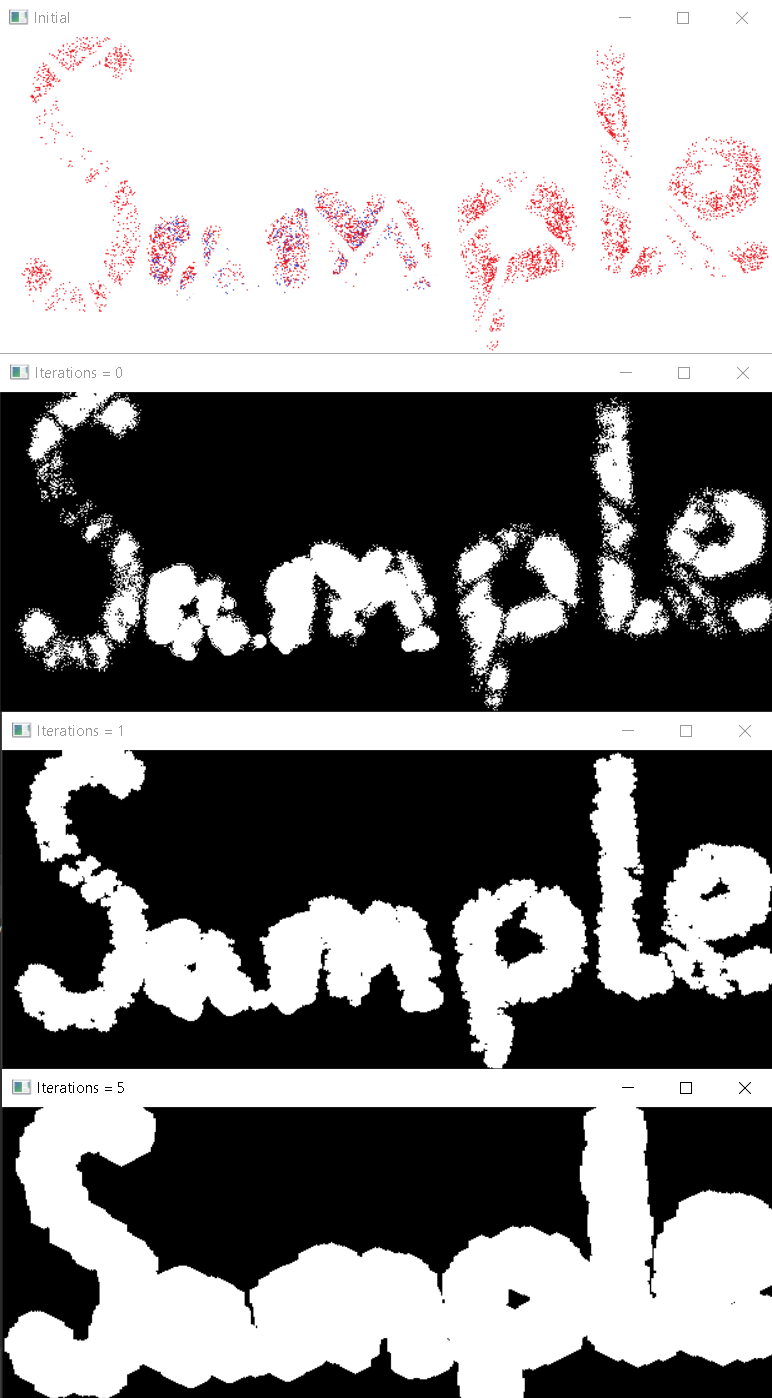
By increasing the number of iterations, you can close badly visible contours
transform.img_prep(frame, (1, 0, 0), (255, 255, 255), 0, 0)
transform.img_prep(frame, (1, 0, 0), (255, 255, 255), 1, 0)
transform.img_prep(frame, (1, 0, 0), (255, 255, 255), 5, 0)